Do our Design Principles ever really change, or do we just change the methods of achieving them?
Interfaces went from command lines to menus to a single AI text field that can answer with anything. We ran a usability study to find out whether the classic design principles died along the way - or just changed clothes.
Four eras, one trajectory
A flint arrowhead and a cursor arrow sit on the same line for a reason: the tool keeps changing, the intent does not.
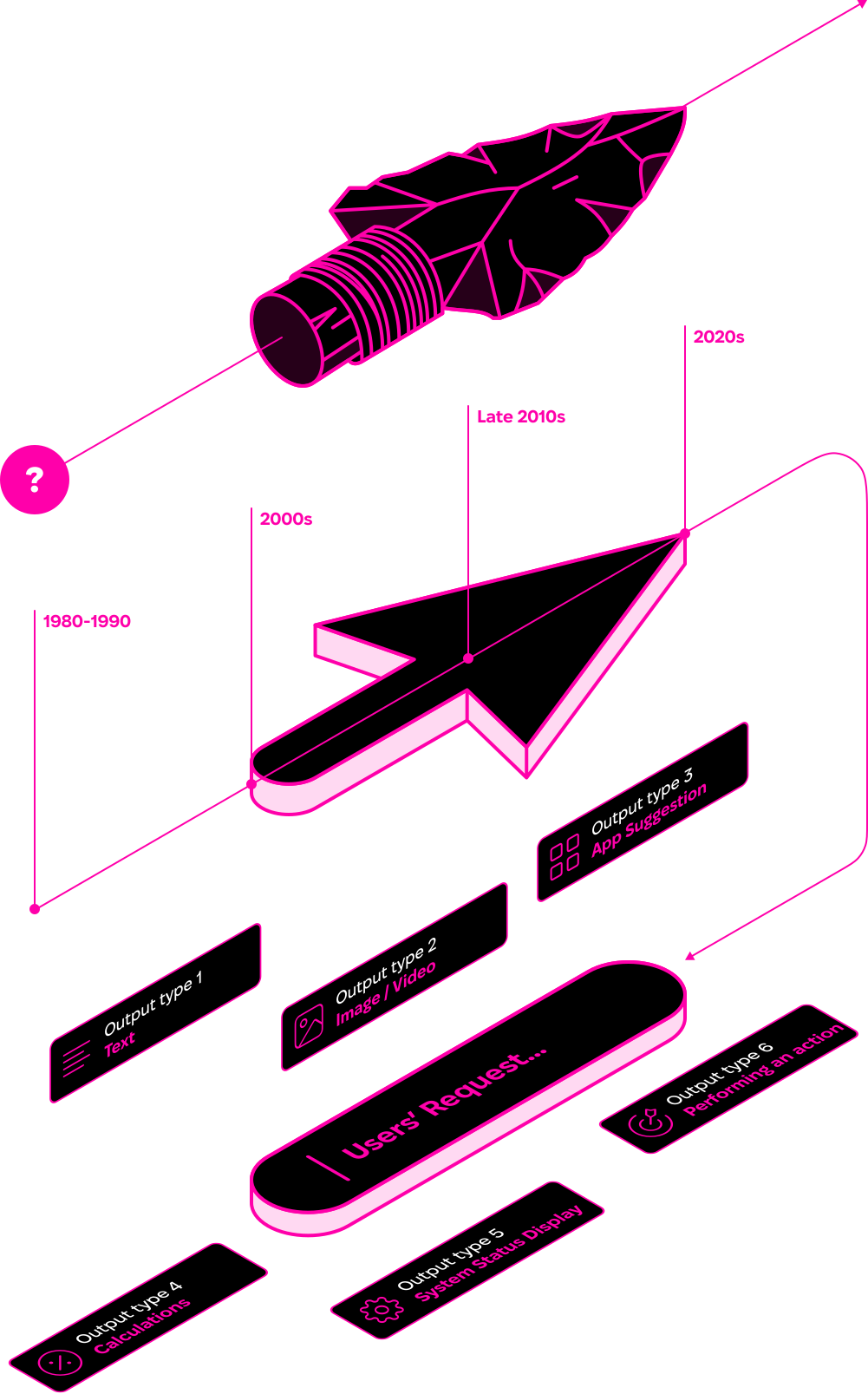
1980s direct manipulation → 2000s interactive search → late-2010s conversational assistants → 2020s Infinite Interfaces. Every era answers the same "Users' Request".
Research Question
Do foundational DMI principles - clear feedback, transparent action-effect mapping, usability consistency - still hold for modern AI-based interfaces such as Infinite Interfaces? Or do IIs require rethinking interaction design from scratch?
A bit about DMIs
Introduced in 1982 (Shneiderman), direct manipulation refers to interfaces where users act on visible objects with instant feedback, rather than issuing command-like instructions. DMI principles emphasize:
- Visibility of system status
- Immediate feedback
- Intuitive control / natural mappings
- Low error rates + easy recovery
- Support for novices and experts
What are Infinite Interfaces?
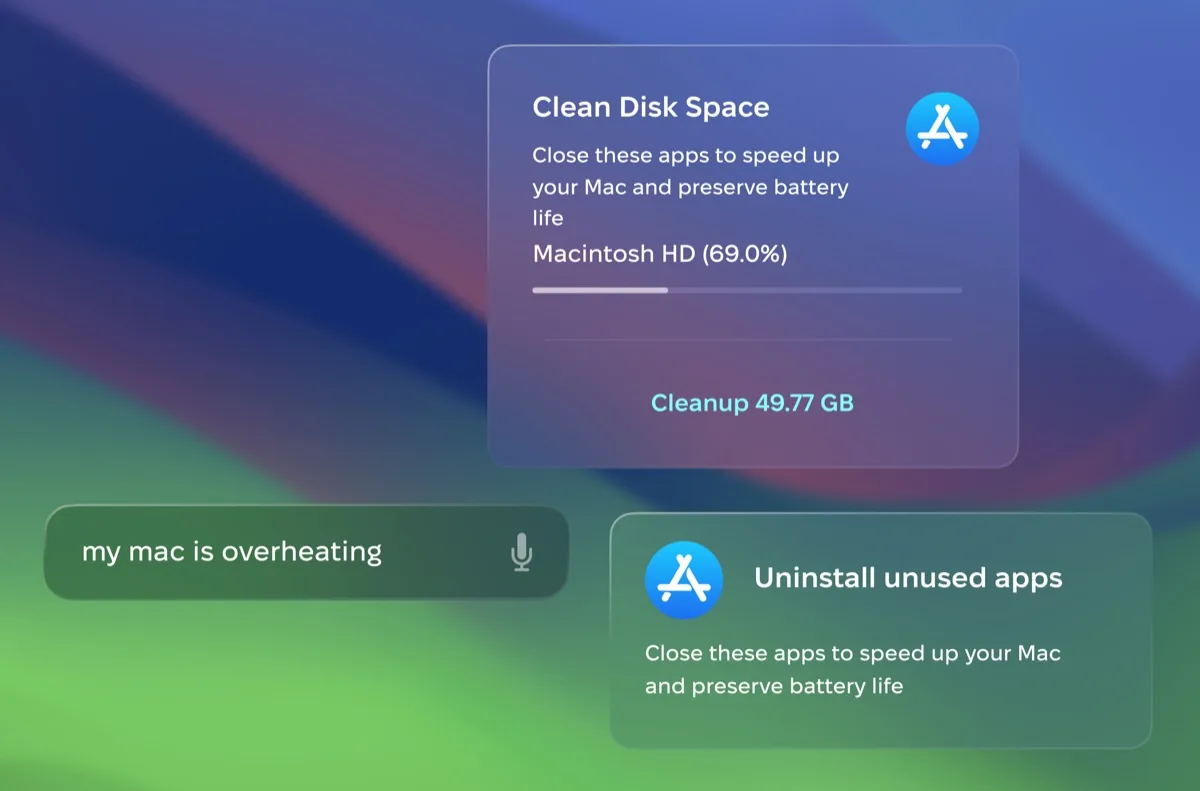
Infinite Interfaces (IIs) are AI agents that dynamically adapt outputs and the UI in response to user input, providing contextually relevant, personalized experiences.
Key characteristics:
- Works across local device, web services, and cloud APIs in one experience.
- Single input field (text / file / voice) as the main entry point.
- Progressive disclosure: extra controls appear only when relevant to the current task and context.
- Uses NLP + context to move beyond fixed feature sets - system status, launching apps, suggesting tools, multi-step help.
Study Design

Method
Moderated usability study. N=10, ages 20-35, medium technical literacy.
3 tasks
(1) delete apps; (2) detect malware; (3) diagnose overheating.
Procedure
Think-aloud + post-task reflection; issues clustered.
Findings - what users struggled with, and liked
Uncertainty on how to begin and phrase requests
Users hesitated and were unsure how to phrase requests - command or question?
"Just a second, I need to think how to ask…"
Phrasing varies wildly, even for the same intent
People used different terms ("virus" vs "malware"), different styles (questions vs commands), and made typos and spelling mistakes.
Complex tasks create output-interpretation issues
In the overheating task, some participants didn't understand what the system proposed or what was actionable.
Hints and autocomplete reduced effort and boosted confidence
Many users relied on system hints after typing the first word and appreciated the speed and guidance.
"Oh, it already shows me what to do? That's very quick, I love it."
Actionable outputs were appreciated
Buttons like "Improve" landed well - when they were clearly interpretable.
Design Principles for Infinite Interfaces
Based on the findings, we derived six principles for IIs:
Provide clear initial instructions
Onboarding and scaffolding for systems that users have weak mental models of.
Design for user input
Semantic alignment: tolerate typos, vagueness, and non-expert language.
Personalize the user's experience
Use context and history to reduce repetitive effort.
Visually distinguish output types
Make actions recognizable at a glance.
Preserve visual clarity
Prioritize and filter - avoid option overload.
Propose output options
When input is ambiguous, offer plausible interpretations to choose from.
One request, six kinds of answers
An II can respond with more than text - so each output type must be recognizable at a glance:

Output type
Text

Output type
Image / Video

Output type
App Suggestion

Output type
Calculations

Output type
System Status Display

Output type
Performing an action
Alignment of II and DMI Principles
Our mapping indicates that II principles largely preserve DMI goals, but extend them with extra mechanisms needed for AI-driven interaction:
| II Principle | Corresponding DMI Principle | How II Extends DMI |
|---|---|---|
| Provide clear initial instructions | Visibility of system state; support for novice learning | Adds onboarding, scaffolding, and proactive communication of system capabilities for unfamiliar AI-driven systems with weak mental models. |
| Design for user input | Intuitive control and natural mappings; minimizing the Gulf of Execution | Handles ambiguous, error-prone, or natural-language inputs, shifting the burden of semantic alignment from the user to the system. |
| Personalize the user's experience | User empowerment and usability | Uses contextual data, habits, and predictive automation to anticipate needs and reduce repetitive effort. |
| Visually distinguish output types | Visibility and immediate feedback | Differentiates multiple output modalities (text, images, apps, sound) so users can recognize options at a glance and reduce memory load. |
| Preserve visual clarity | Simplicity and reduced cognitive load | Prioritizes and filters to show only the most relevant information in context, avoiding option overload. |
| Propose output options | Immediate feedback and reversibility | Offers several likely interpretations of vague inputs so users can steer without reformulating requests. |
Principles don't change.
Methods do.
The full paper covers the study, the derivation of the II principles, and the complete DMI mapping.